
Instant Character Recognition
Date: 2024-11-27With the help of Long Island CW Club (LICW), I continue my quest to learn CW well enough that I can listen to it and comprehend conversationally at 20 words per minute or better.
An essential skill for conversational CW is speedy character recognition, or as it is3 often called, Instant Character Recognition, or ICR. Many current instructional materials for learning Morse code refer to Nancy Kott's article Instant Recognition: A Better Method Of Building Morse Code Speed. Recently I've experienced a plateau in CW speed at about 17 words per minute. Re-reading Ms. Kott's article I find that it is the plateau she described for another learner. With my progress to date, I had assumed that I did, indeed have "instant character recognition" as described in the article. But several instructors within LICW suggested that I take another look; I may not really have ICR. With the help of a new software tool, I have proven them right!
Code-smore, a practice tool for Morse Code
Code-Smore is software conceived by me and written by my son, Ryan McGuire. Code-smore's fecr-quiz can be used as an evaluation tool, and as a practice tool for Instant Character Recognition, or as I call it Fast Enough Character Recognition. I'm a good touch typist, and the tool was designed for me. I think it will be helpful to you, on your path to Fast Enough Character Recognition, if you are also a good touch typist.
The fecr-quiz presents single characters in morse code, and measures response time at the keyboard. For an initial measurement of my ability, I asked it to send the 26 characters at 30 wpm and report my response times. My results are below. The reaction times shown factor out a baseline time required to signal the fingers and press a key. I determined my time to be 380 milliseconds (more on that later).
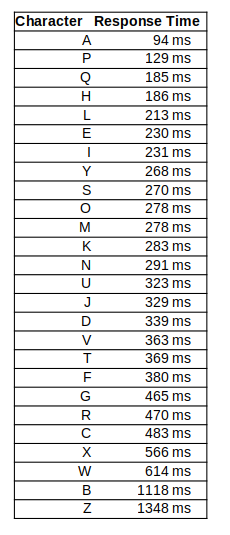
As a learner, I'll need to make some judgements about these results, but one thing is very clear: if "A" is instantly recognized, then "Z" clearly is not. Using fecr-quiz as a practice tool, I can work on a subset of characters, for instance, RCXWBZ. I did those exercises for a couple of days, and found that the extreme variations were reduced, but I still have work to do! What I'd like to see is a small variance in the response times, which would make my slowest responses quite close to the fastest.
Update July 16, 2025
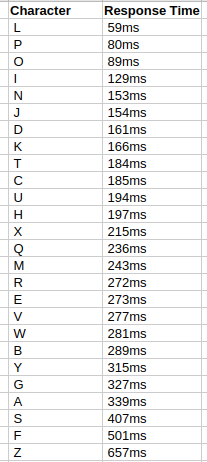
My current results (an improvement)
Update December 17, 2025 My current results (more improvement)
| Character | Response Time |
|---|---|
| L | 43ms |
| O | 95ms |
| V | 96ms |
| F | 96ms |
| G | 127ms |
| U | 145ms |
| S | 160ms |
| Z | 160ms |
| Y | 167ms |
| A | 173ms |
| P | 178ms |
| H | 188ms |
| D | 188ms |
| Q | 191ms |
| K | 194ms |
| C | 205ms |
| N | 212ms |
| B | 216ms |
| X | 222ms |
| R | 227ms |
| I | 254ms |
| M | 272ms |
| W | 302ms |
| T | 309ms |
| J | 343ms |
| E | 364ms |
Code-smore usage examples
Code-smore is a command line software tool for Windows and Linux operating systems. If you are not conversant with command line tools, here's a video that shows how to install code-smore on a Windows PC.
For the output above, the command was:
code-smore fecr-quiz -c ABCDEFGHIJKLMNOPQRSTUVWXYZ --wpm 30 -b 380 This means: - use all the characters of the alphabet - use character speed of 30 wpm - use baseline latency of 380 ms
To estimate my baseline latency, I used fecr-quiz itself, to test just two characters, "E" and "T" (dit and dah).
code-smore fecr-quiz -c ET --random --trials 8 -b 0 This means: - present either a dit or a dah randomly 8 times - use a baseline of zero to get an absolute reaction time
This test gave me an average absolute reaction time of 380 milliseconds.
Code-smore usage
``` Usage: code-smore fecr-quiz [OPTIONS]
Core Options:
-c, --characters
code-smore fecr-quiz --help and codes-smore --help will show additional functionality. Complete documentation of code-smore is here: README.md
Code-smore installation and execution
Windows
- Download the zip file: code-smore-v0.1.25-Windows-x86_64.zip (Release date 2024-11-25)
- Unzip the file and place "code-smore.exe" in a folder of your choosing
- Open the command line interface in that folder and type the command code-smore (with options of your choice)
Linux
- Download the tar.gz file: code-smore-v0.1.25-Linux-x86_64.tar.gz (Release date 2024-11-25)
- Un-archive the file and place the executable binary, "code-smore" in a folder of your choosing
- From the command line, execute code-smore (with options of your choice)
Later releases (if any) will be found here: https://github.com/EnigmaCurry/code-smore/releases/latest
Additional Resources
code-smore Video Guide to Installation Better ICR a web app by John Merkel: Evaluate and practice ICR Instant Recognition: A Better Method Of Building Morse Code Speed, by Nancy Kott The Path to Morse Code Fluency by Tom Weaver
Notes
- The fecr-quiz uses the keyboard to evaluate a response time to auditory stimulus. It's a convenient tool to use for touch typists. I do not wish to imply that learners of Morse code for ham radio operation should plan to transcribe code by typing it out. I am examining my own mastery of the sounds of Morse code with this tool. My objective is to become comfortable with "head copy", in other words to make CW a conversational language. A natural auditory language. Mastery of the alphabet is required. Transcription is not the goal. Indeed, after mastering characters, the next goal is to allow words formed by those characters to simply flow into my head!
- "Fast Enough Character Recognition" is a term that I made up, becuase I have a personal, fundamental objection to the term, "Instant Character Recognition." I respect the use of the term ICR, but it is manifestly true that no biological response to stimuli is instantaneous. The magic of CW for highly skilled operators is that characters are recognized so quickly that in the space between characters, three things occur: recognition of the character, registering that character in memory, and relating the character to previously received characters. That is an amazing human feat calling upon our inate language processing center. Morse code at 20 words per minute has inter-character spacing of 180 milliseconds. Since the operator has 3 functions to perform, we can assume that recognition must occur in less than 60 ms. With practice, as the process becomes subconscious, we can assume that recognition is much less than 60 milliseconds. It is magical but the time required is something greater than zero. It is simply fast enough.
- I thank Ryan McGuire for working with me to make this application. Despite my past years as a "software engineer", his skills are light-years ahead of mine. This project came together quickly, and effectively. I am grateful and in awe.
Comments
I welcome your comments. You do NOT need to sign in to leave a comment. If you create an account and sign in, my comment system will notify you of replies to your comment. Thanks for stopping by.--Duane McGuire